Intake to payment,
without the chasing.
Every business action governed. Live in 4–5 weeks.
WorkStreams
Intake to paid, and everything in between.
Four WorkStreams ship pre-built on the Procurement App. Each runs on a Playbook you configure to your policies and systems.
Each WorkStream plays in turn. Choose one to stay on it.
From a request in plain words to a PO the supplier has confirmed.
Playbook run, Intake to purchase order
Illustrative run with sample data.
- Intake: Requester asks for 12 sit-stand desks; Intake Agent pre-fills the intake form. Recorded on the Execution Ledger: Intake captured.
- Requisition: Requisition Drafter drafts the requisition; Routing rules send it to quotes. Recorded on the Execution Ledger: Route set: quotes.
- Sourcing: Vendor Matcher proposes who to invite; RFQ Email Drafter drafts the RFQ emails; Buyer confirms three and sends them. Recorded on the Execution Ledger: 3 RFQs sent.
- Quotes in: Quote Extractor reads an emailed quote; Buyer checks and saves it. Recorded on the Execution Ledger: 3 quotes in.
- Compare & Validate: Comparison Analyst recommends Ridgeway Office; Buyer selects it; ERP checks budget on the priced total; Budget Check Reporter shows the requester the result. Recorded on the Execution Ledger: Quote selected, budget passed.
- Approval: Structuring Agent checks whether to combine or split; Approver approves, duties kept separate. Recorded on the Execution Ledger: Approved.
- PO issued: ERP creates and sends the PO; Vendor acknowledges; PO Summary Agent shows the requester the PO. Recorded on the Execution Ledger: PO acknowledged.
- Ask in plain words. Get a ready requisition.
- Quotes compared for you. Your buyer picks.
- Budget, supplier and price checked before the PO goes out.
The quote comparison screen, with sample data. The demo walks through every screen.
Agent Team
Agents prepare the work. Your people decide.
25 agents across four WorkStreams. Each works on one stage, with only the tools that stage allows. Your team works with them in Veroli, and the VeroCortex™ Reasoning Engine runs each WorkStream on its Playbook.
Intake to purchase order
· 9 agentsTurns a request in plain words into a pre-filled intake form.
Drafts the requisition and its lines for the requester to review.
Proposes which vendors to invite to quote, with a reason for each.
Drafts the RFQ email for each vendor without portal access. The buyer sends it.
Reads an emailed quote into a form the buyer checks.
Compares quotes against price history and recommends one.
Shows the requester the budget result, and the way forward if it fails.
Suggests combining or splitting requisitions, with its reasoning.
Shows the requester the PO once the vendor confirms it.
Vendor onboarding
· 5 agentsTurns the buyer's message, or a hand-off, into a pre-filled vendor request.
Lists gaps and inconsistencies in the vendor's profile.
Checks documents against what the category and risk tier require.
Proposes a risk tier and its requirements, with the reasons.
Puts every check, the tier and the documents on one card for the three approvers.
PO change and expedite
· 6 agentsReads vendor emails for changes to date, quantity or price.
Ties a change to the PO lines it affects, with its urgency.
Shows the work orders at risk, cover in days and commitments affected.
Asks the vendor for an expedite price and records the reply.
Ranks the options by total cost, doing nothing first.
Drafts the amendment emails and records the vendor's counter.
Invoice to payment
· 5 agentsReads emailed or scanned invoices into header and lines.
Shows a suspected duplicate side by side, with its paid status.
Proposes the GL account and cost center where the PO can't code a line.
Shows invoiced, ordered and received side by side, with the difference and tolerance.
Drafts the email asking the vendor for a credit note or a corrected invoice.
The Shift
From chasing work to finished work.
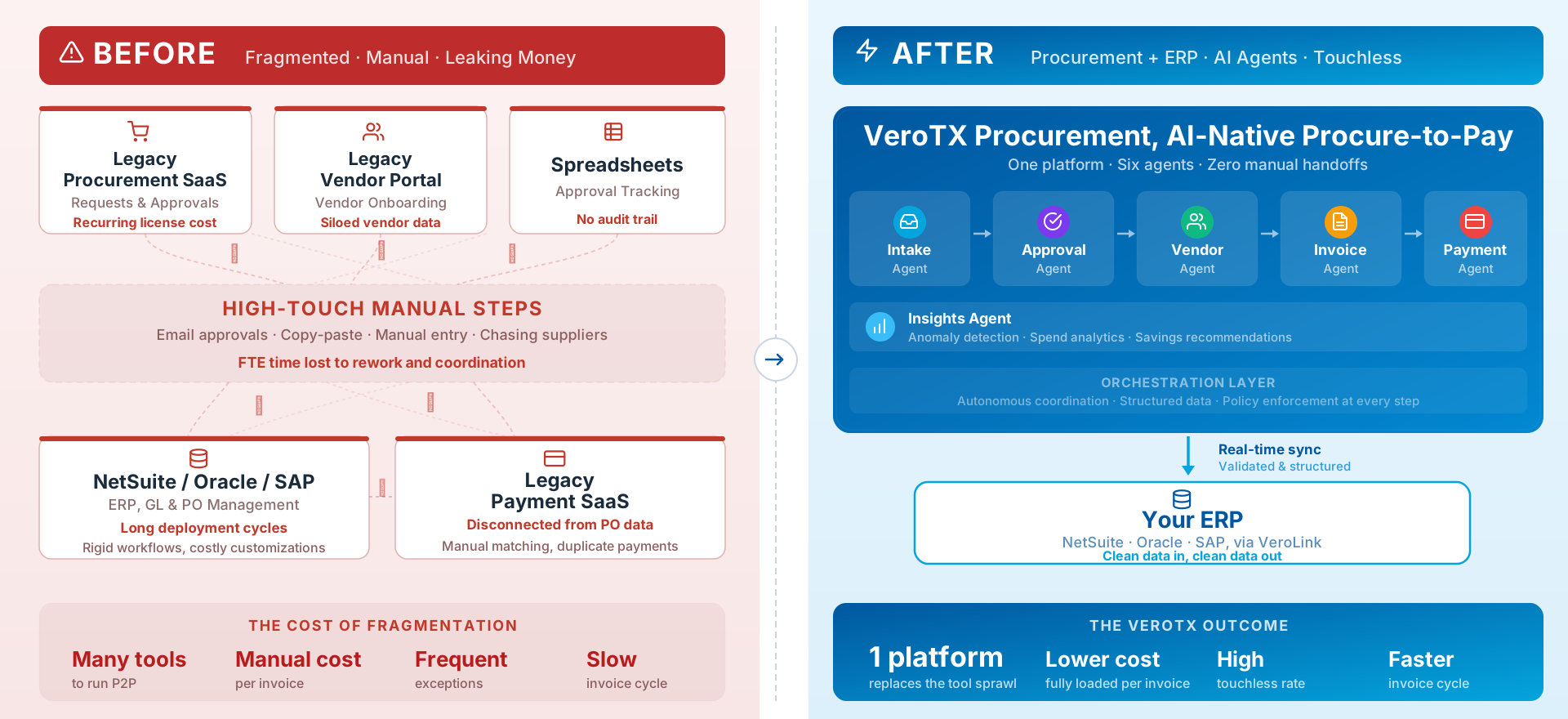
Procurement runs across inboxes, spreadsheets and your ERP. VeroTX runs each step in one governed WorkStream.
Work waits in inboxes
Requests, quotes and vendor changes arrive by email and wait for someone to chase them.
Checks done by hand
Budget, screening, matching and bank details are checked one system at a time.
Decisions scattered
When an auditor asks who approved what, the answer is spread across email threads.
VeroCortex
Every decision on the record. Every business action auditable.
The VeroCortex™ Reasoning Engine runs each WorkStream on a versioned Playbook, inside the limits you set.
What this looks like in your business
An invoice doesn't match its PO. An agent lays out what was invoiced, ordered and received, with the difference and whether it is within tolerance. AP accepts it within their limit, asks the buyer or the vendor, or sends it to the Controller for an override. The decision and who made it go on the Execution Ledger.
A team of agents works on one outcome, each on its own stage.
When a connected system is slow or down, work waits safely and gets a named owner if it stalls.
Every business action recorded on the Execution Ledger.
Integrations & Connectivity
Pre-built, secure connectors, ready via API and MCP.
Plug into the systems your teams already run. Every connector is governed by role-based access and scoped credentials, and every business action it takes is recorded on the Execution Ledger.
API + MCP ready
Every connector is callable by agents through native APIs or the Model Context Protocol.
Secure by default
OAuth, scoped tokens, a secrets vault and per-tenant isolation.
Two-way sync
Read and write across systems of record, with retries, no duplicate writes, and reconciliation.


%20--%3e%3csvg%20version='1.2'%20baseProfile='tiny-ps'%20id='Layer_1'%20xmlns='http://www.w3.org/2000/svg'%20xmlns:xlink='http://www.w3.org/1999/xlink'%20viewBox='0%200%2096%2096'%20xml:space='preserve'%3e%3ctitle%3eDocusign%3c/title%3e%3cdesc%3eThis%20is%20the%20Docusign%20logo.%20It%20is%20made%20up%20of%20the%20Docusign%20icon%20called%20the%20Nexus%20and%20the%20Docusign%20wordmark.%20The%20Nexus%20is%20represents%20a%20convergence%20showing%20two%20shapes%20coming%20together.%20They%20form%20the%20shape%20of%20an%20agreement%20in%20the%20center.%3c/desc%3e%3crect%20y='0'%20fill='%23FFFFFF'%20width='96'%20height='96'/%3e%3cpath%20d='M63.2,19H38.6c-0.9,0-1.7,0.7-1.7,1.7V33H24.6c-0.9,0-1.7,0.7-1.7,1.7v38.9c0,0.9,0.7,1.7,1.7,1.7h38.9%20c0.9,0,1.7-0.7,1.7-1.7v-6.8h0v-5.2l0.3,0c10.2-0.1,13.7-9.4,13.7-23.7C79.2,23.6,75.1,19,63.2,19z'/%3e%3cpath%20fill='%23FF5252'%20d='M84.1,37.7c0,14.3-8.3,23.8-18.5,23.9V43.7c0-0.5-0.2-1-0.6-1.3L55.7,33c-0.3-0.3-0.8-0.6-1.3-0.6H36.4V15.5%20c0-0.9,0.7-1.7,1.7-1.7h25.1C75,13.9,84.1,23.5,84.1,37.7z'/%3e%3cpath%20fill='%234C00FF'%20d='M65.6,61.6v16.9c0,0.9-0.7,1.7-1.7,1.7H19.5c-0.9,0-1.7-0.7-1.7-1.7V34.1c0-0.9,0.7-1.7,1.7-1.7h16.9v27.4%20c0,0.9,0.7,1.7,1.7,1.7L65.6,61.6z'/%3e%3cpath%20d='M65,42.2c0.3,0.3,0.6,0.8,0.6,1.3v18l-27.5-0.1c-0.9,0-1.7-0.7-1.7-1.7V32.4h17.9c0.5,0,1,0.2,1.3,0.6L65,42.2z'/%3e%3c/svg%3e)







Browse the full connector directory
Need a system that isn't listed? Ask us.
From AI pilots to governed procurement in weeks.
See how the four WorkStreams fit your policies and systems, live in 4–5 weeks.